マイナンバーカードの保険証利用登録がお済でない方は、今すぐご登録を! 申し込み方法はこちら
Please contact the Call Center if you have any questions or problems regarding the My Number Card. Inquiries about My Number System
健康保険の情報の確認方法
How to check your Health Insurance Certificate information
マイナポータルで確認
マイナ保険証が利用できる方は、マイナポータルでご自分の記号・番号・枝番やご加入の組合の保険者番号を確認できます。
事前にマイナンバーカードの保険証利用の申請が必要です。
以下の手順に従ってマイナポータルにログインしてご確認ください。
手順1:マイナポータルにログイン
マイナポータル へのログイン方法はデジタル庁のホームページでくわしい動画解説が公開されていますのでご参照ください。
手順2:メニューから「健康保険証」を選択
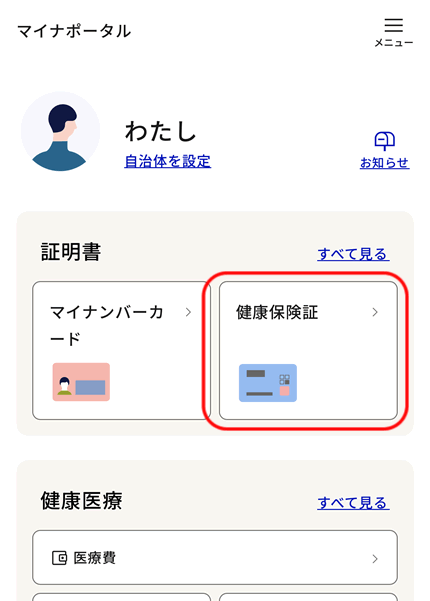
ログイン後、ホーム画面の「証明書」>「健康保険証」を選択します。
手順3:健康保険証の資格情報を確認
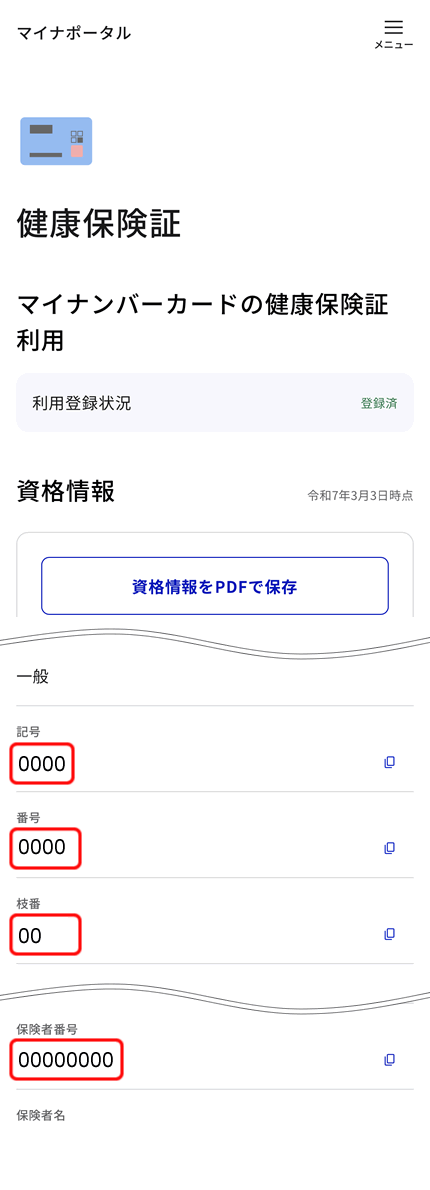
健康保険証の資格情報が表示されるので画面をスクロールして必要な情報を確認してください。
(参考)過去の資格情報の確認方法
マイナポータルでは過去に加入していた健康保険の資格情報も確認できます。
マイナポータルにログイン後、メニューから以下の順に選択します。
- 「その他のわたしの情報」
- 「健康・医療」
- 「その他の項目」
- 「医療保険」
「取得する情報の選択」画面で取得依頼対象日を指定して「確認する」をクリックし、内容を確認のうえ「取得する」を選択してください。
取得完了後は「回答結果一覧へ」から結果を確認できます。
Check on Mynaportal website(マイナポータル)
If you have a My Number Card, you can check your health insurance member code, number, branch number, the name of your insurer, and the insurer number on Mynaportal.
You need to apply in advance to use your My Number Card as your Health Insurance Certificate.
Please follow the steps below to log in to Mynaportal and check.
Step 1: Log in to Mynaportal
Mynaportal website : For detailed video explanations on how to log in, please refer to the Digital Agency's website.
Step 2: Select 'Health Insurance Certificate' from the menu
After logging in, select 'Certificates' > 'Health Insurance Certificate' from the home screen.
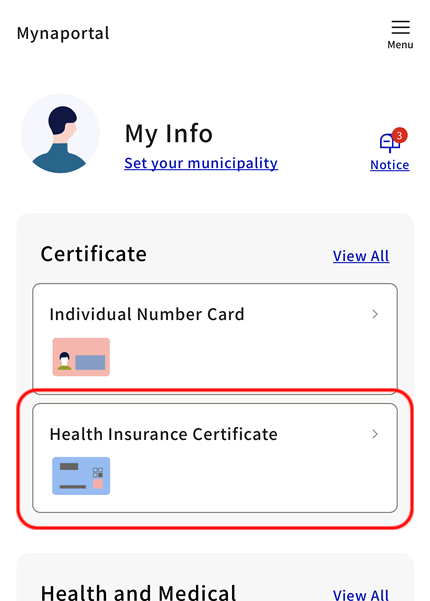
Step 3: Check the health insurance information on your health insurance certificate
The health insurance information on your health insurance certificate will be displayed, so scroll through the screen to check the necessary information.
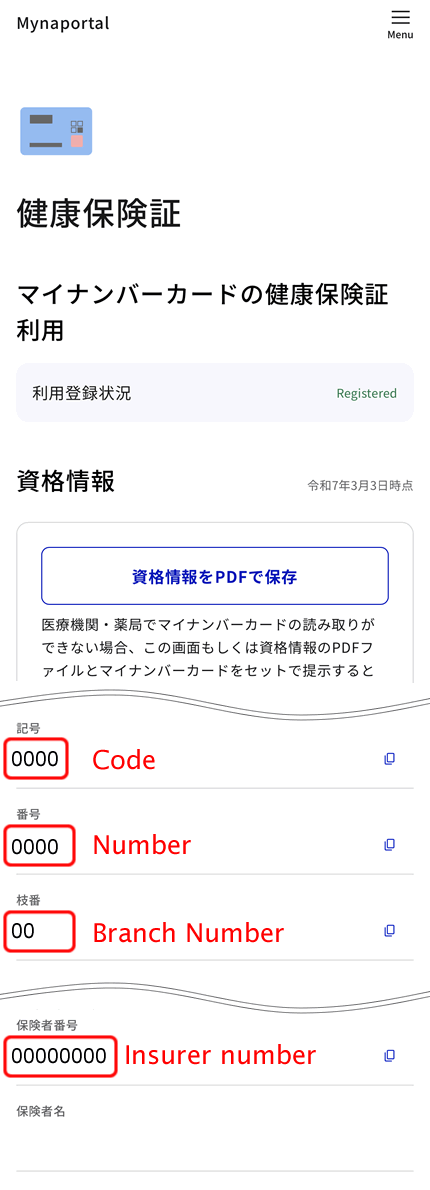
How to check past eligibility information
You can also check the eligibility information of the health insurance you were enrolled in the past on Mynaportal.
After logging in to Mynaportal, select the following from the menu in order:
- 「その他のわたしの情報」(Other My Information)
- 「健康・医療」(Health & Medical)
- 「その他の項目」(Other Items)
- 「医療保険」(Medical Insurance)
On the 「取得する情報の選択」('Select Information to Obtain') screen, specify the target date for the request, click 「確認する」('Check'), review the content, and then select 「取得する」('Obtain').
After the acquisition is complete, you can check the results from 「回答結果一覧へ」('Response Results List').
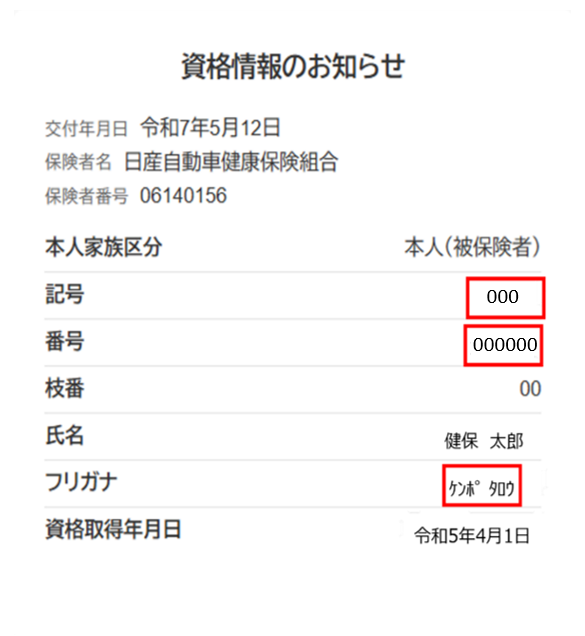
資格情報のお知らせで確認
「資格情報のお知らせ」は加入者に「健康保険の記号・番号等の資格情報」をお知らせするものです。 なお、「資格情報のお知らせ」通知だけでは保険診療を受けることはできないため、マイナンバーカードを併せて持参する必要があります。
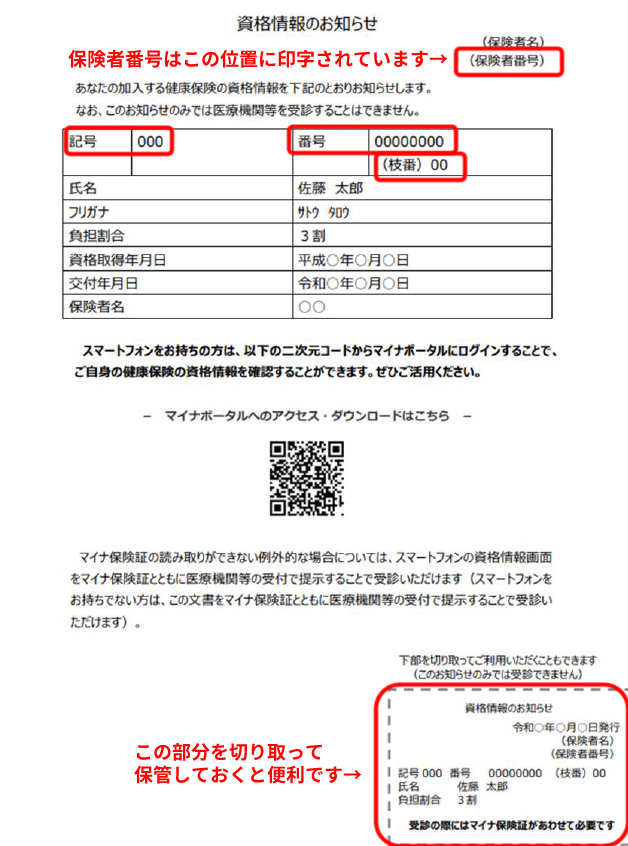
Health Insurance Eligibility Information
The Health Insurance Eligibility Information is issued when you acquire Health insurance eligibility due to joining a company or changing jobs, or when you become a dependent. Please note that you cannot receive insured medical treatment with this notification alone, so you need to bring it along with your My Number Card.
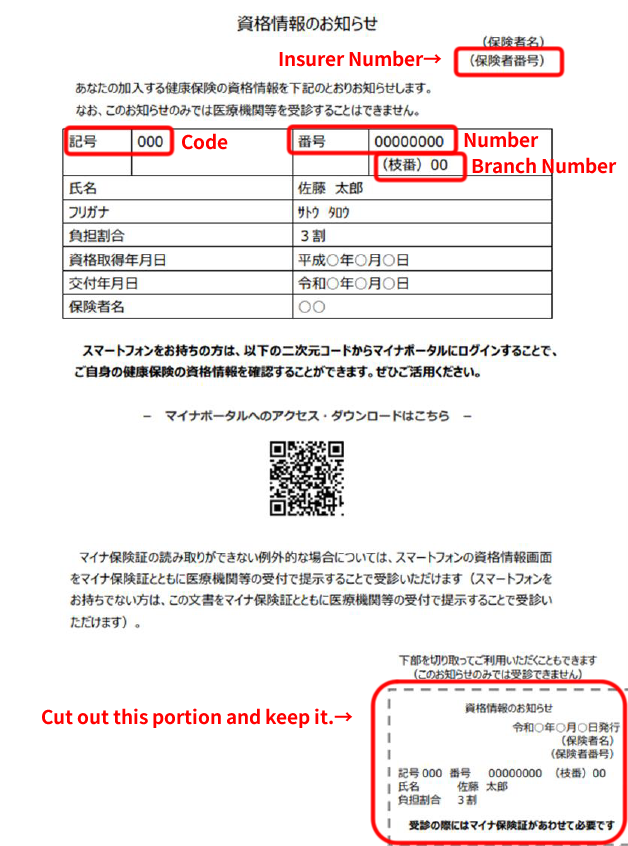
保険証で確認
従来の保険証は2025年12月1日で利用できなくなります
» 申請方法はこちら(「マイナポータル」を開きます)
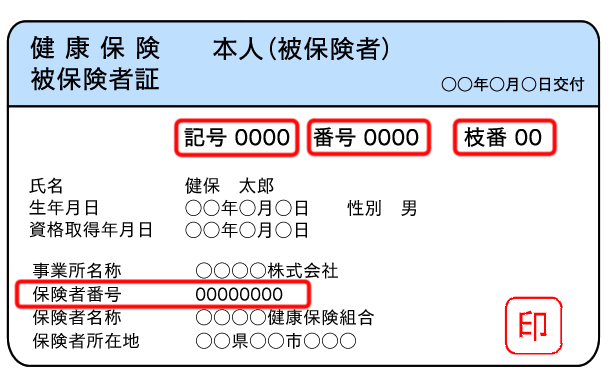
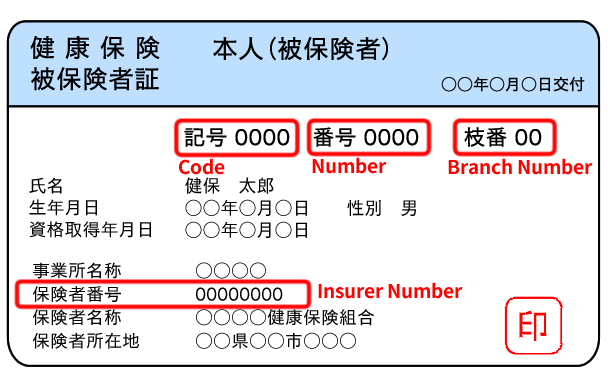
保険証にはご自分の記号・番号・枝番やご加入の組合の組合名、保険者番号が記載されています(保険証のデザインはご加入の健康保険組合によって異なります)。
Check with your Health Insurance Card
Conventional Health insurance cards will no longer be valid from December 2, 2025.
» 申請方法はこちら(「マイナポータル」を開きます)
Your insurance card lists your health insurance member code, number, branch number, the name of your insurer, and the insurer number. The design of the certificate varies depending on the health insurance provider you are enrolled with.
資格確認書で確認
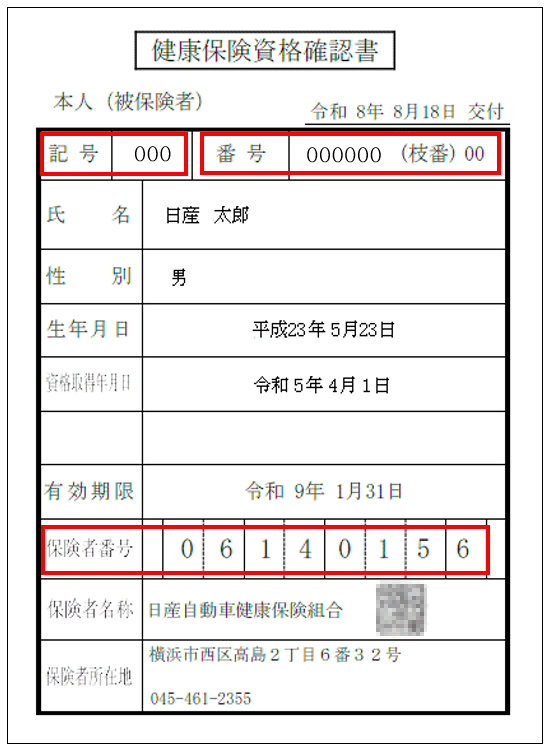
「資格確認書」はマイナ保険証が利用できない方(持っていない方)にのみ交付されます。
Health Insurance Eligibility Certificate
The Health Insurance Eligibility Certificate is issued only to those who do not have a My Number Card.
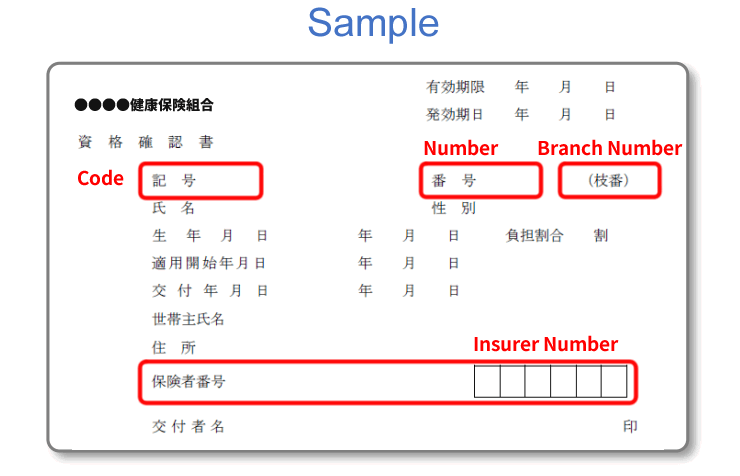
There are three types of Health Insurance Eligibility Certificates: card, postcard, and A4 size. Although the format varies depending on the insurer you are enrolled with, the content is almost identical to that of the conventional health insurance card.
Example of a card-type Health Insurance Eligibility Certificate
 Pep Upで確認
Pep Upの利用登録をされている場合は、ログイン後の画面からご自分の記号・番号・枝番やご加入の組合の保険者番号を確認できます。
» ※Pep Upの利用登録はこちら
ブラウザ画面で確認
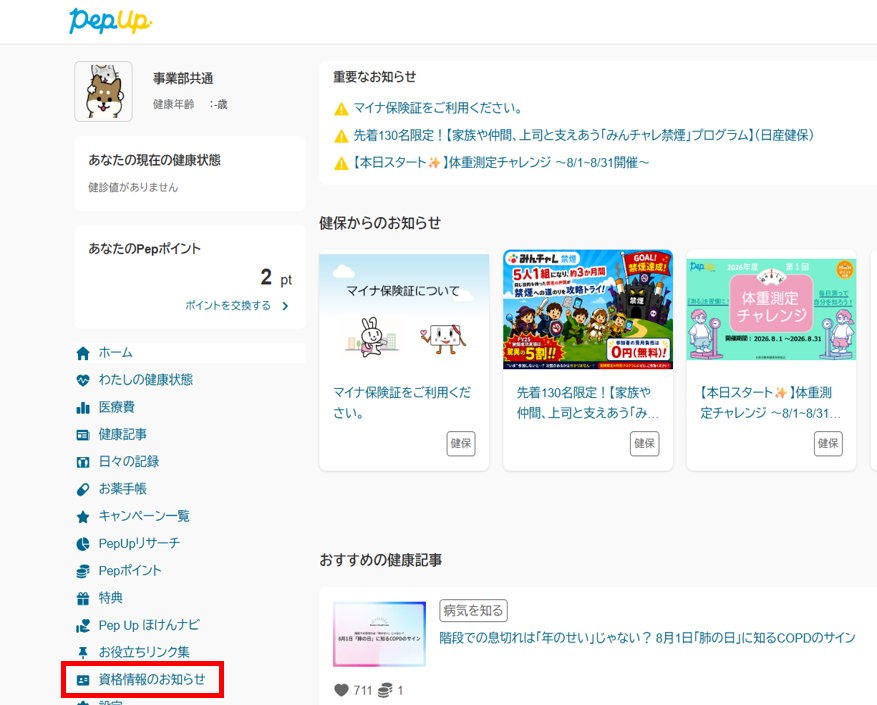
手順1:メニューから『資格情報のお知らせ』を選択
ログイン後、ホーム画面の『資格情報のお知らせ』を選択します。
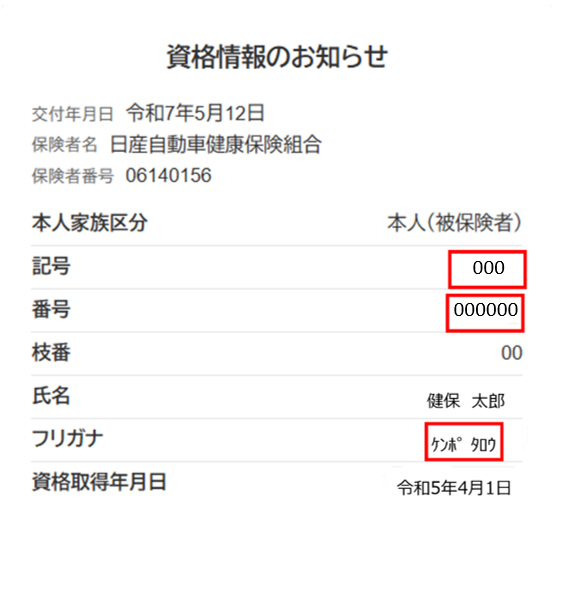
手順2:資格情報を確認
資格情報が表示されるので必要な情報を確認してください。
アプリ画面で確認
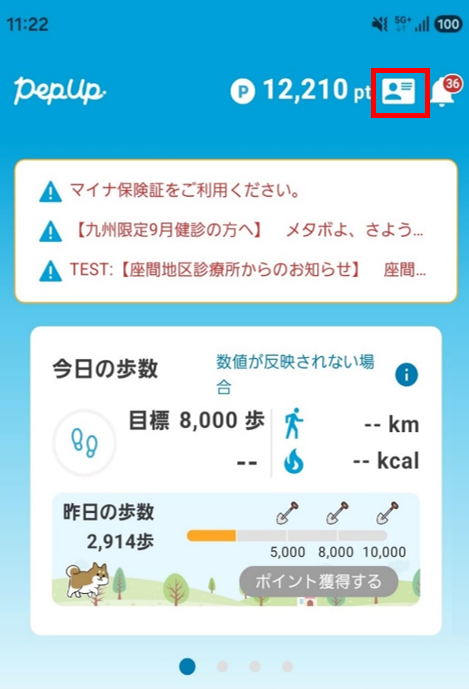
手順1:メニューから『資格情報のお知らせ』を選択
ログイン後、ホーム画面右上のカードのアイコンを選択します。
手順2:資格情報を確認
資格情報が表示されるので必要な情報を確認してください。